
Rocky 10:dnf-automatic 的定时器语义与安全上线顺序
Rocky Linux 10.2 Server 组虚拟机,dnf-automatic-4.20.0-22.el10_2.rocky.0.1。
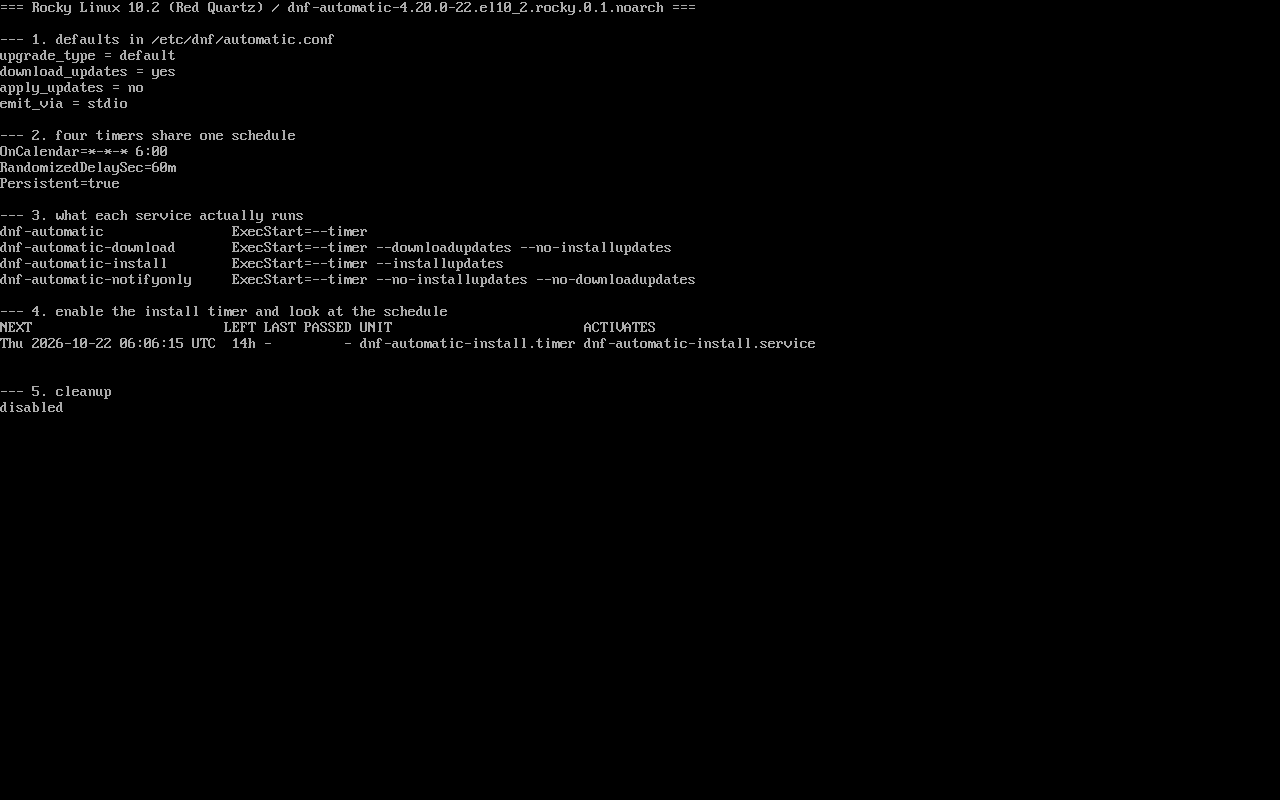
本页原有内容基于 Rocky 9 容器;现在换成 EL10 真机重新取证:读配置、读 unit、启用一个 timer 观察下次触发、关闭复原。截图:public/evidence/dnf-automatic/rocky-timers.png。
三个字段决定「什么时候跑」
Section titled “三个字段决定「什么时候跑」”$ grep -h -E "^(OnCalendar|RandomizedDelaySec|Persistent)" /usr/lib/systemd/system/dnf-automatic.timerOnCalendar=*-*-* 6:00RandomizedDelaySec=60mPersistent=trueOnCalendar:每天 06:00;RandomizedDelaySec=60m:在 06:00 之后随机等最多 60 分钟;Persistent=true:关机期间错过的触发,开机后补一次。
启用后 systemctl list-timers 会显示真实的下次时间,例如 Thu 2026-10-22 06:53:19 UTC——不是 06:00 属于正常。
四个 unit 的分工
Section titled “四个 unit 的分工”dnf-automatic.service ExecStart=--timerdnf-automatic-download.service ExecStart=--timer --downloadupdates --no-installupdatesdnf-automatic-install.service ExecStart=--timer --installupdatesdnf-automatic-notifyonly.service ExecStart=--timer --installupdates --no-downloadupdates四个 timer 完全同构(同一时间表),所以选型只取决于「让机器做到哪一步」:
| 想做的事 | 启用 |
|---|---|
| 按配置文件走(默认只下载) | dnf-automatic.timer |
| 一定只下载 | dnf-automatic-download.timer |
| 一定安装 | dnf-automatic-install.timer |
| 只发通知 | dnf-automatic-notifyonly.timer |
配置文件是第四个变量
Section titled “配置文件是第四个变量”$ grep -E "^(apply_updates|download_updates|upgrade_type|emit_via)" /etc/dnf/automatic.confupgrade_type = defaultdownload_updates = yesapply_updates = noemit_via = stdioapply_updates = no 意味着即使启用 dnf-automatic.timer,也只下载不安装。timer 决定何时跑,service 决定跑到哪一步,配置决定范围与默认动作——三者一起才决定结果。
渐进上线:通知 → 下载 → 安装
Section titled “渐进上线:通知 → 下载 → 安装”# systemctl enable --now dnf-automatic-notifyonly.timer # 第 1 周:只看会更新什么# systemctl disable --now dnf-automatic-notifyonly.timer# systemctl enable --now dnf-automatic-download.timer # 第 2 周:提前下载# systemctl disable --now dnf-automatic-download.timer# systemctl enable --now dnf-automatic-install.timer # 之后:真正安装这样做的好处是每一阶段都有日志可查:
$ journalctl -u dnf-automatic-install.service -n 30直接上 install 的风险是:第一次运行就可能一次性装上几个月的更新,重启后行为变化难以定位。
systemctl list-timers 'dnf-automatic*' --no-pager # 下次触发时间与上次结果systemctl cat dnf-automatic-install.service # 确认 ExecStart 参数journalctl -u dnf-automatic-install.service -n 50 # 实际跑到哪一步若 list-timers 的 LAST 列一直是 -,说明还没跑过;此时可以手动触发一次验证链路:
# systemctl start dnf-automatic-install.service通知没到:按 timer → 退出码 → 发射器 的顺序查
Section titled “通知没到:按 timer → 退出码 → 发射器 的顺序查”收到「开了 notifyonly 但没有邮件」时,先别动配置文件,按顺序确认三件事。
第一步,timer 到底跑没跑
$ systemctl list-timers 'dnf-automatic*' --no-pagerNEXT LEFT LAST PASSED UNIT ACTIVATESLAST 是 - 说明从未触发;有值再进入下一步。
第二步,那一次运行成功了吗
$ systemctl show dnf-automatic-notifyonly.service -p Result -p ExecMainStatusResult=exit-codeExecMainStatus=1Result=exit-code 表示任务本身失败,此时发不发邮件已经不重要,先修它:
$ journalctl -u dnf-automatic-notifyonly.service -n 5 --no-pager... Error: Failed to download metadata for repo 'appstream': ...... Failed to start dnf-automatic-notifyonly.service - dnf automatic notification of updates.我们这台离线实验机就是这样:手动跑一次直接 System is off-line.,退出码 1。
第三步,才轮到发射器
$ grep -E "^emit_via" /etc/dnf/automatic.confemit_via = stdiostdio 不发邮件;改成 email 还需要本机 MTA 与 25 端口有人监听(本机实测 sendmail 不存在、:25 计数 0)。
顺序反了,最容易把「任务失败」误判成「邮件配置错」。
- 同时启用多个 timer:任务会并行跑,可能争抢 dnf 锁(
Waiting for process with pid ...); - 改了 conf 以为要重启 timer:不必,每次运行都会重新读配置;
- 只看 timer 不看 service:通用 timer 配
apply_updates=no的行为差异就藏在这; - 在离线机器上开 install:日志里只会是仓库不可达,别怀疑 timer 没触发。
练习:确认随机延迟真的存在
Section titled “练习:确认随机延迟真的存在”sudo systemctl enable --now dnf-automatic-install.timersystemctl list-timers 'dnf-automatic*' --no-pager | head -3sudo systemctl disable --now dnf-automatic-install.timer检查:
- NEXT 的时间不是整点 06:00;
systemctl cat dnf-automatic-install.timer能看到RandomizedDelaySec=60m;- 关闭后
systemctl is-enabled返回 disabled; - 理解「随机延迟」是服务端友好的设计,不是配置错误。
常见问题
能改成每周一次吗?
可以,覆盖 timer 的 OnCalendar(例如 weekly 或 *-*-* 03:00 Mon),用 systemctl edit 建 drop-in 更规范。
更新后要重启怎么办?
dnf-automatic 不管重启;用 reboot-policy 或 needs-restarting -r 配合维护窗口处理。
notifyonly 的通知发到哪?
由 emit_via 决定(stdio 进 journal,email 需配置 SMTP),没有 MTA 时只会看到日志。
- 仓库配置:/repos/
- 事务回滚:/dnf-history-rollback/
- 重启策略:/reboot-policy/