
Rocky 10: dnf-automatic timer semantics and a safe rollout order
Test scope
Section titled “Test scope”A Rocky Linux 10.2 Server VM with dnf-automatic-4.20.0-22.el10_2.rocky.0.1.
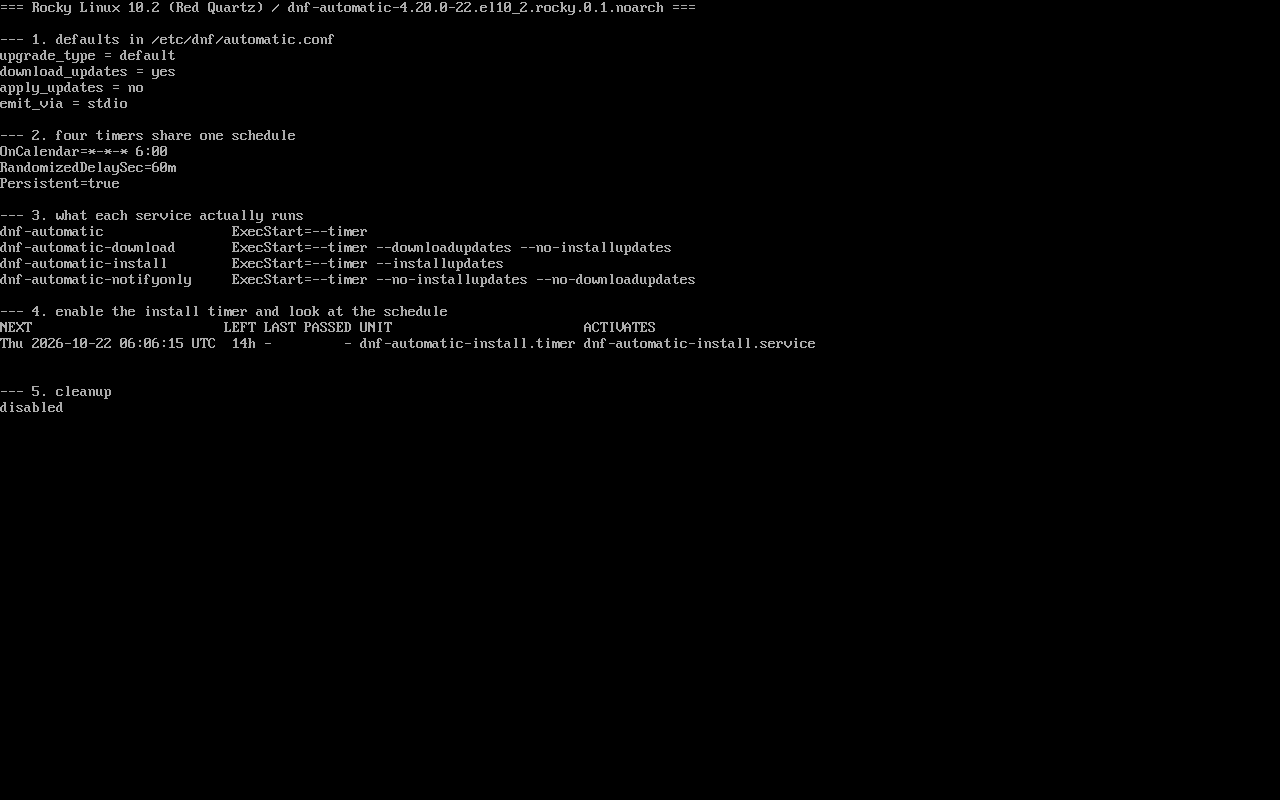
The previous version of this page was verified in a Rocky 9 container; it has been re-measured on an EL10 host: read the config, read the units, enable one timer to watch the next run, then disable it. Screenshot: public/evidence/dnf-automatic/rocky-timers.png.
Three fields decide when it runs
Section titled “Three fields decide when it runs”$ grep -h -E "^(OnCalendar|RandomizedDelaySec|Persistent)" /usr/lib/systemd/system/dnf-automatic.timerOnCalendar=*-*-* 6:00RandomizedDelaySec=60mPersistent=trueOnCalendar: daily at 06:00;RandomizedDelaySec=60m: wait up to 60 random minutes after 06:00;Persistent=true: if the machine was off, run once after boot.
Once enabled, systemctl list-timers shows the real next run, for example Thu 2026-10-22 06:53:19 UTC — not 06:00, and that is correct.
How the four units differ
Section titled “How the four units differ”dnf-automatic.service ExecStart=--timerdnf-automatic-download.service ExecStart=--timer --downloadupdates --no-installupdatesdnf-automatic-install.service ExecStart=--timer --installupdatesdnf-automatic-notifyonly.service ExecStart=--timer --installupdates --no-downloadupdatesAll four timers share the same schedule, so the choice is only about how far the run should go:
| Goal | Enable |
|---|---|
| Follow the config (download only by default) | dnf-automatic.timer |
| Force download only | dnf-automatic-download.timer |
| Force installation | dnf-automatic-install.timer |
| Notification only | dnf-automatic-notifyonly.timer |
The config file is the fourth variable
Section titled “The config file is the fourth variable”$ grep -E "^(apply_updates|download_updates|upgrade_type|emit_via)" /etc/dnf/automatic.confupgrade_type = defaultdownload_updates = yesapply_updates = noemit_via = stdioapply_updates = no means even the generic timer only downloads. The timer sets when, the service sets how far, the config sets scope and default action — all three together determine the outcome.
Rollout: notify, then download, then install
Section titled “Rollout: notify, then download, then install”# systemctl enable --now dnf-automatic-notifyonly.timer # week 1: see what would change# systemctl disable --now dnf-automatic-notifyonly.timer# systemctl enable --now dnf-automatic-download.timer # week 2: pre-download# systemctl disable --now dnf-automatic-download.timer# systemctl enable --now dnf-automatic-install.timer # afterwards: applyEach stage leaves evidence:
$ journalctl -u dnf-automatic-install.service -n 30Going straight to install risks applying months of updates at once, which makes a post-reboot regression hard to attribute.
Verification and triage
Section titled “Verification and triage”systemctl list-timers 'dnf-automatic*' --no-pager # next run and last resultsystemctl cat dnf-automatic-install.service # confirm the ExecStart flagsjournalctl -u dnf-automatic-install.service -n 50 # how far the run gotIf the LAST column stays -, the timer has never fired; trigger one run manually to test the chain:
# systemctl start dnf-automatic-install.serviceNo notification? Check timer, exit code, then emitter
Section titled “No notification? Check timer, exit code, then emitter”When “notifyonly is enabled but no mail arrives”, resist editing the config first and confirm three things in order.
Step one: did the timer fire at all
$ systemctl list-timers 'dnf-automatic*' --no-pagerNEXT LEFT LAST PASSED UNIT ACTIVATESIf LAST is -, it never ran; only continue when there is a value.
Step two: did that run succeed
$ systemctl show dnf-automatic-notifyonly.service -p Result -p ExecMainStatusResult=exit-codeExecMainStatus=1Result=exit-code means the task itself failed, and mail delivery is irrelevant until it is fixed:
$ journalctl -u dnf-automatic-notifyonly.service -n 5 --no-pager... Error: Failed to download metadata for repo 'appstream': ...... Failed to start dnf-automatic-notifyonly.service - dnf automatic notification of updates.That is exactly what our offline lab host does: a manual run prints System is off-line. and exits 1.
Step three: only now the emitter
$ grep -E "^emit_via" /etc/dnf/automatic.confemit_via = stdiostdio sends no mail, and switching to email also requires a local MTA with something listening on port 25 (measured here: sendmail absent, :25 count 0).
Doing it in the wrong order is how a failed run gets mistaken for a mail configuration problem.
Common traps
Section titled “Common traps”- Several timers enabled at once: runs overlap and fight over the dnf lock (
Waiting for process with pid ...); - Thinking the timer needs a restart after editing the config: it re-reads the file on every run;
- Watching the timer only: the
apply_updates=nodifference lives in the service/config pair; - Enabling install on an offline host: the journal only shows unreachable repositories.
Practice: confirm the random delay is real
Section titled “Practice: confirm the random delay is real”sudo systemctl enable --now dnf-automatic-install.timersystemctl list-timers 'dnf-automatic*' --no-pager | head -3sudo systemctl disable --now dnf-automatic-install.timerChecks:
- NEXT is not exactly 06:00;
systemctl cat dnf-automatic-install.timershowsRandomizedDelaySec=60m;- After disabling,
systemctl is-enabledreports disabled; - The delay is a design choice to spread load, not a misconfiguration.
常见问题
Can I run it weekly instead?
Yes, override the timer OnCalendar (for example weekly or *-*-* 03:00 Mon); a systemctl edit drop-in is the clean way.
What about reboots after updates?
dnf-automatic does not reboot. Pair it with a reboot policy or needs-restarting -r inside a maintenance window.
Where do notifyonly messages go?
emit_via decides: stdio lands in the journal, email needs SMTP configured; without an MTA you only see logs.
Next steps
Section titled “Next steps”- Repositories: /en/repos/
- Transaction rollback: /en/dnf-history-rollback/
- Reboot policy: /en/reboot-policy/