
Rocky 10: reading the symbols in chronyc sources
Test scope
Section titled “Test scope”A Rocky Linux 10.2 Server VM with chrony-4.8-2.el10.
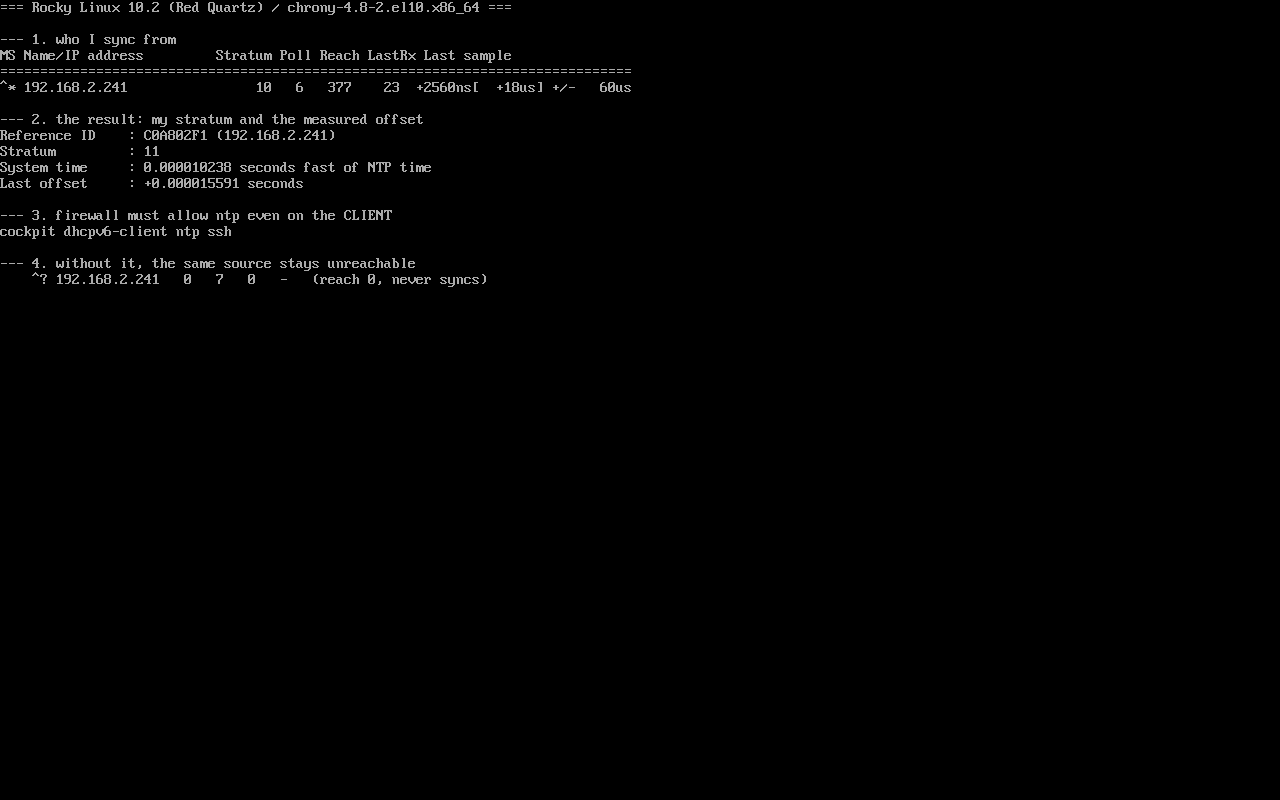
The VM was pointed at a self-hosted LAN source (192.168.2.241, stratum 10) so the full transition from “unreachable” to “synchronised” could be observed. Screenshot: public/evidence/chrony/rocky-client.png.
Before it syncs
Section titled “Before it syncs”$ chronyc sourcesMS Name/IP address Stratum Poll Reach LastRx Last sample===============================================================================^? 192.168.2.241 0 7 0 - +0ns[ +0ns] +/- 0ns^?: unreachable or failed validation;Stratum 0: no valid time yet;Reach 0: none of the last 8 probes got a reply (reach is an 8-bit bitmap shown in octal);LastRx -: nothing has ever been received.
That single line explains most “the clock is wrong” reports: chrony is running, it just never reached the source.
After it syncs
Section titled “After it syncs”$ chronyc sources^* 192.168.2.241 10 6 377 23 +2560ns[ +10us] +/- 60us^*: the selected system peer;377: octal for11111111— the last 8 probes all replied;+2560ns: the last measured offset; brackets show the corrected value;+/- 60usis the estimated error.
$ chronyc tracking | grep -E '^(Reference ID|Stratum|System time|Last offset)'Reference ID : C0A802F1 (192.168.2.241)Stratum : 11System time : 0.000010238 seconds fast of NTP timeLast offset : +0.000015591 secondsUpstream 10, this host 11, offset in the tens of microseconds — what a direct LAN source can deliver.
The trap: the client needs ntp opened too
Section titled “The trap: the client needs ntp opened too”$ firewall-cmd --list-servicescockpit dhcpv6-client ntp sshchrony sends queries from source port 123 by default, so replies are addressed to port 123 — the client’s inbound side needs ntp as well. Open it only on the server and the client sits at ^? / Reach 0 while ping works perfectly, which is exactly what makes this hard to spot.
Measured contrast:
| Client firewalld | sources state |
|---|---|
| ntp not allowed | ^?, Reach 0, server shows NTP packets received: 0 |
| ntp allowed | ^*, Reach 377, offset in microseconds |
Symbol reference
Section titled “Symbol reference”| Symbol | Meaning | Action |
|---|---|---|
^* | current sync source | normal |
^+ | acceptable candidate, not selected | normal with multiple sources |
^- | judged outlier | inspect that source |
^? | unreachable or failed validation | check network and ports first |
^x | falseticker (contradicts the majority) | drop that source |
Reach is an octal bitmap: 377 = 255 = all eight succeeded, 1 = only the latest, 0 = none.
Common traps
Section titled “Common traps”- Calling it “unconfigured” because tracking shows stratum 0: read
sourcesreach first; - Forgetting the client-side ntp allowance: see above;
- Judging right after
systemctl restart chronyd: the first reply takes seconds and reach needs a few polls; - Expecting a lone
serverline to win: withpoolentries present chrony selects the best source, not the only one.
Practice: watch the state change
Section titled “Practice: watch the state change”chronyc sourcessudo firewall-cmd --list-servicessudo chronyc tracking | grep -E '^(Reference ID|Stratum|System time)'sudo chronyc sourcestats | head -4Checks:
- Is the symbol
^*or^?; - Is
Reachclose to377; - Does
Reference IDresolve to your source’s IP; - Is
Freq Skewreasonable (a LAN source is usually well under 100 ppm).
常见问题
Why is reach shown in octal?
It is a bitmap of the last eight probes; octal keeps it narrow — 377 means all eight succeeded.
What offset is normal?
Direct LAN is usually under 100 µs, internet sources 1–10 ms; hundreds of milliseconds points at the link or the upstream.
Do I need makestep?
On VMs with a large initial skew, `makestep 1.0 3` in chrony.conf steps the clock on the first updates instead of slewing slowly.
Next steps
Section titled “Next steps”- Offline updates: /en/offline-updates/
- Timers: /en/systemd-timers/