
Rocky 10: quadlet's contract with systemd, and stocking images offline
Test scope
Section titled “Test scope”A Rocky Linux 10.2 Server VM with podman 5.8.2 / quadlet 5.8.2.
No registry is reachable from the lab, so the first problem was “where does the image come from”; only then could the full lifecycle be verified. Screenshot: public/evidence/quadlet/rocky-quadlet.png.
Offline images: import a minimal rootfs
Section titled “Offline images: import a minimal rootfs”D=/tmp/lab-img2; mkdir -p "$D/bin" "$D/lib64"cp /bin/bash "$D/bin/bash"for lib in $(ldd /bin/bash | awk '/=>/ {print $3}'); do cp -L "$lib" "$D/lib64/"; donecp -L /lib64/ld-linux-x86-64.so.2 "$D/lib64/"tar -C "$D" -cf /tmp/rootfs.tar .podman import --change 'CMD ["/bin/bash","-c","while true; do read -t 30 || true; done"]' \ /tmp/rootfs.tar localhost/labshell:1read -t 30 is a bash builtin, so no coreutils are needed — a bash-plus-libraries image can stay up indefinitely.
A real trap came up here: an arm64 image exported elsewhere fails on this x86_64 host with Exec format error, and the journal says image platform (linux/arm64/v8) does not match the expected platform (linux/amd64).
The contract: extra fields in the generated unit
Section titled “The contract: extra fields in the generated unit”The .container file only declares [Container] and [Install], yet the unit contains:
$ systemctl cat webapp.service | grep -E "^(Wants|After|RequiresMountsFor|Delegate|KillMode|ExecStop)"Wants=network-online.targetAfter=network-online.targetRequiresMountsFor=%t/containersKillMode=mixedExecStop=/usr/bin/podman rm -v -f -i lab-webappDelegate=yes| Field | Why it exists |
|---|---|
Wants/After=network-online.target | networking ready before pulling |
RequiresMountsFor=%t/containers | container storage mounted first |
KillMode=mixed | signal the main process, then clean the cgroup |
ExecStop=podman rm -v -f -i | stopping the service deletes the container (with anonymous volumes) |
Delegate=yes | the container manages its own cgroup (nested systemd, CPU limits) |
Why conmon owns the port
Section titled “Why conmon owns the port”$ systemctl start webapp.service; sleep 3$ systemctl is-active webapp.serviceactive$ podman ps --format '{{.Names}} | {{.Status}} | {{.Ports}}'lab-webapp | Up 3 seconds | 0.0.0.0:8088->80/tcp$ ss -tlnp | grep 8088LISTEN 0 4096 0.0.0.0:8088 0.0.0.0:* users:(("conmon",pid=10657,fd=5))conmon is podman’s per-container supervisor; it holds the published host port and forwards into the container namespace. Consequences:
ssshowsconmon, never your application;- the firewall rule applies to that host port;
- the port listens even when the app is dead, so “port open” is not “service healthy”.
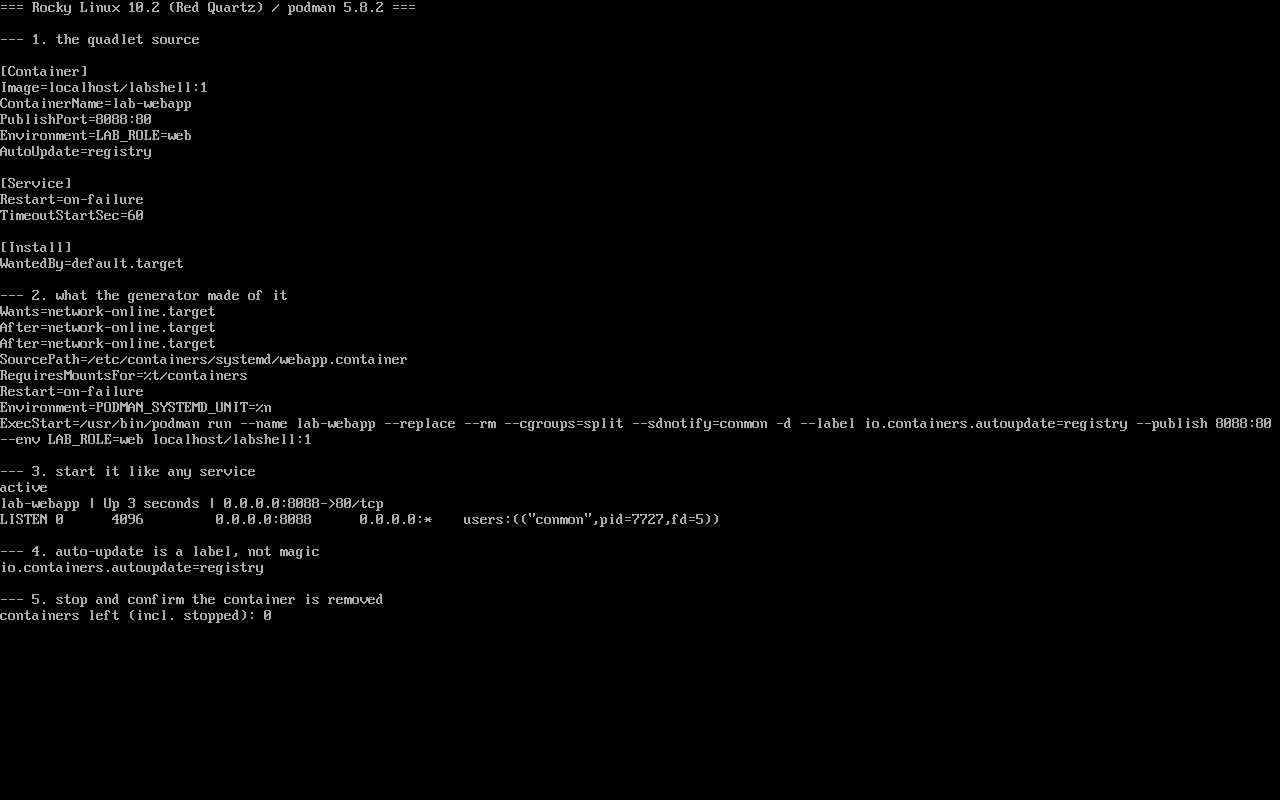
daemon-reload is the real switch
Section titled “daemon-reload is the real switch”quadlet is a systemd generator (/usr/lib/systemd/system-generators/podman-system-generator) that runs at boot and on daemon-reload:
$ systemctl daemon-reload # regenerate webapp.service$ systemctl start webapp.serviceSkip the reload and systemctl cat keeps showing the old unit — the most common “my change did nothing”.
Three commands that answer most questions
Section titled “Three commands that answer most questions”systemctl cat webapp.service # the real, generated unit — the only source of truthjournalctl -u webapp.service -n 50 # pull, start and exit reasonspodman ps -a --format '{{.Names}} {{.Status}}' # leftovers and crash loopssystemctl cat matters because there is a generator between your file and the final podman run; guessing is wasteful.
Common traps
Section titled “Common traps”Exec format error: image architecture does not match the host (we hit it with an arm64 image);- Endless restarts:
Restart=on-failureamplifies a failing container — readjournalctlfor the exit code first; podman psempty but the port is taken: a staleconmon; checkpodman ps -atogether withss;- Inventing install targets: quadlet expects
default.target.
Practice: from failure to success
Section titled “Practice: from failure to success”sudo tee /etc/containers/systemd/broken.container >/dev/null <<'EOF'[Container]Image=localhost/missing:1[Install]WantedBy=default.targetEOFsudo systemctl daemon-reloadsudo systemctl start broken.service # expected to failsudo journalctl -u broken.service -n 10 --no-pager | tail -5Checks:
- The failure is a missing image, not a syntax error;
- Change
Image=tolocalhost/labshell:1,daemon-reload, start — it works; systemctl catshows the correspondingpodman run;- Clean up:
systemctl disable --now, delete the file, reload.
常见问题
How do I supply images offline?
Export on a connected host (skopeo or podman save), copy in and podman load; or build a minimal image with podman import as done here.
How should the app log?
Write to stdout/stderr; podman forwards to journald, so journalctl -u <unit> shows everything.
Can a failed container be recreated automatically?
Yes, [Service] Restart=on-failure with RestartSec; watch for restart storms and fix the root cause first.
Next steps
Section titled “Next steps”- Containers and images: /en/containers/
- Logs: /en/journald-logging/
- Timers: /en/systemd-timers/