
Rocky 10: why sshd -T does not show your Match settings
Test scope
Section titled “Test scope”A Rocky Linux 10.2 Server VM with OpenSSH_9.9p1.
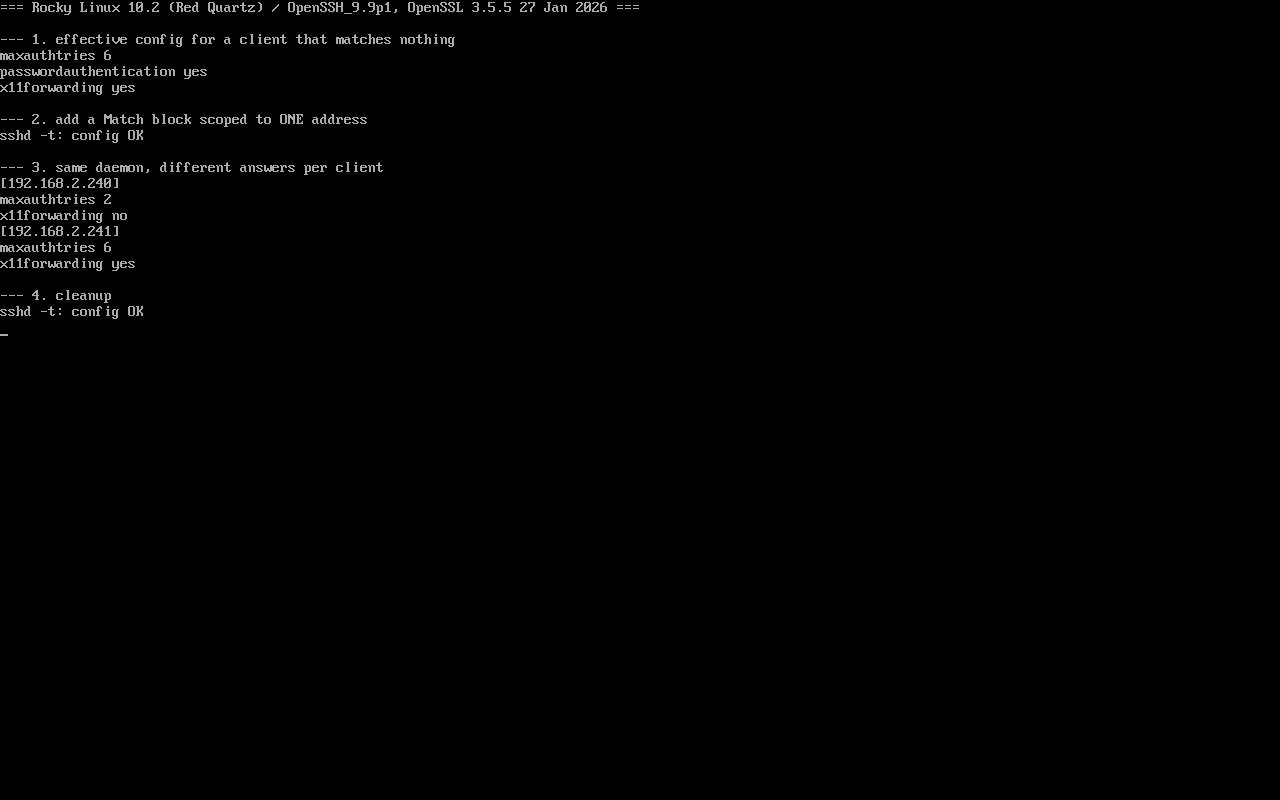
Experiment: read the global effective config, add a source-scoped Match block, evaluate two addresses with sshd -T -C, then clean up. Screenshot: public/evidence/sshd/rocky-match.png.
Two commands, two views
Section titled “Two commands, two views”$ sshd -T -C user=labuser,host=localhost,addr=192.168.2.241 | grep -E '^(maxauthtries|x11forwarding|passwordauthentication)'maxauthtries 6passwordauthentication yesx11forwarding yes| Command | Answers | Use it when |
|---|---|---|
sshd -t | is the syntax valid | right after editing |
sshd -T | global effective values | checking defaults |
sshd -T -C user=…,host=…,addr=… | values for that connection | proving a Match applies |
Concluding “my config did nothing” from sshd -T alone is the classic mistake.
Add a source-scoped block
Section titled “Add a source-scoped block”Match Address 192.168.2.240 MaxAuthTries 2 X11Forwarding no$ sshd -t && echo "config OK"config OKSame daemon, two answers
Section titled “Same daemon, two answers”$ sshd -T -C user=labuser,host=localhost,addr=192.168.2.240 | grep -E '^(maxauthtries|x11forwarding)'maxauthtries 2x11forwarding no
$ sshd -T -C user=labuser,host=localhost,addr=192.168.2.241 | grep -E '^(maxauthtries|x11forwarding)'maxauthtries 6x11forwarding yesThat is what Match means: one config evaluated per condition, not rules piled onto every connection.
The scoping trap
Section titled “The scoping trap”Everything after Match belongs to that block, until the file ends or the next Match starts:
Match Address 192.168.2.0/24 PasswordAuthentication noX11Forwarding no ← absorbed into the Match, affects only that subnetDrop-ins are loaded in filename order, so “this setting only affects some clients” usually means a directive meant to be global landed inside a Match block.
Locate it with:
sudo sshd -T -C user=labuser,host=localhost,addr=<suspect> | diff - <(sudo sshd -T) | headMatch is not access control
Section titled “Match is not access control”Match changes parameter values, not reachability:
- To keep a subnet out entirely, use firewalld — not a Match block with a non-existent user;
- To allow only certain accounts, use
AllowUsers(which can be refined inside Match); - Authentication still goes through PAM;
MaxAuthTriesonly limits retries.
Common traps
Section titled “Common traps”- Assuming
sshd -tproves it works: it only checks syntax; - Forgetting the reload:
systemctl reload sshd; - Writing global directives after Match: they become block-local;
- Inconsistent address syntax:
192.168.2.0/24and192.168.2.*both work, mixing them causes oversights.
Practice: verify “only for this user”
Section titled “Practice: verify “only for this user””sudo tee /etc/ssh/sshd_config.d/70-user.conf >/dev/null <<'EOF'Match User labuser MaxSessions 1EOFsudo sshd -tsudo sshd -T -C user=labuser,host=localhost,addr=192.168.2.10 | grep maxsessionssudo sshd -T -C user=root,host=localhost,addr=192.168.2.10 | grep maxsessionssudo rm /etc/ssh/sshd_config.d/70-user.confChecks:
labuserreports 1,rootkeeps the default 10;- No reload needed for
-T -C(it reads files, never touches sessions); - Both return to the default after removal;
user=andaddr=dimensions can be combined.
常见问题
Which conditions can Match use?
Address, User, Group, Host, LocalAddress, LocalPort, RDomain and more; comma-separated values are OR, separate keywords are AND.
Does sshd -T -C affect live connections?
No — it parses the config and prints the result; no session is created and nothing is reloaded.
What if my OpenSSH lacks -T -C?
-T exists since OpenSSH 6.8 and -C since 7.x; EL8 and later are fine, EL7 needs an upgrade.
Next steps
Section titled “Next steps”- sudo delegation: /en/sudoers-basics/
- Source filtering: /en/firewalld-zones/