
Rocky 10: module streams are gone, here is what breaks
Test scope
Section titled “Test scope”Two environments:
| Environment | Purpose |
|---|---|
almalinux:9 container (EL9 AppStream) | shows what module streams used to look like |
Rocky Linux 10.2 VM + almalinux:10 container (dnf 4.20.0) | shows actual EL10 behaviour |
Log: plans/content-expansion/evidence/logs/module-streams-el9-el10.log. Screenshot: public/evidence/module-streams/rocky-no-modules.png.
What a stream was on EL9
Section titled “What a stream was on EL9”On EL9 one package exposed several version tracks:
$ dnf module listName Stream Profiles Summarynodejs 18 common [d], development, ... Javascript runtimenodejs 20 common [d], development, ... Javascript runtimenodejs 22 common [d], development, ... Javascript runtimenginx 1.22 common [d] nginx webserverphp 8.1 common [d], devel, minimal PHP scripting languageThe resulting RPM carries a module build tag:
# dnf -y module install nodejs:22/common$ rpm -q nodejsnodejs-22.23.2-2.module_el9.8.0+322+f4aa738c.x86_64.module_el9.8.0+322+f4aa738c never appears on EL10.
On EL10 the command only warns
Section titled “On EL10 the command only warns”$ dnf module listWARNING: modularity is deprecated, and functionality will be removed in a future release of DNF5.(no list follows)
$ dnf module list nodejsWARNING: modularity is deprecated, and functionality will be removed in a future release of DNF5.Error: No matching Modules to list
$ dnf module enable nodejs:20Error: Problems in request:missing groups or modules: nodejs:20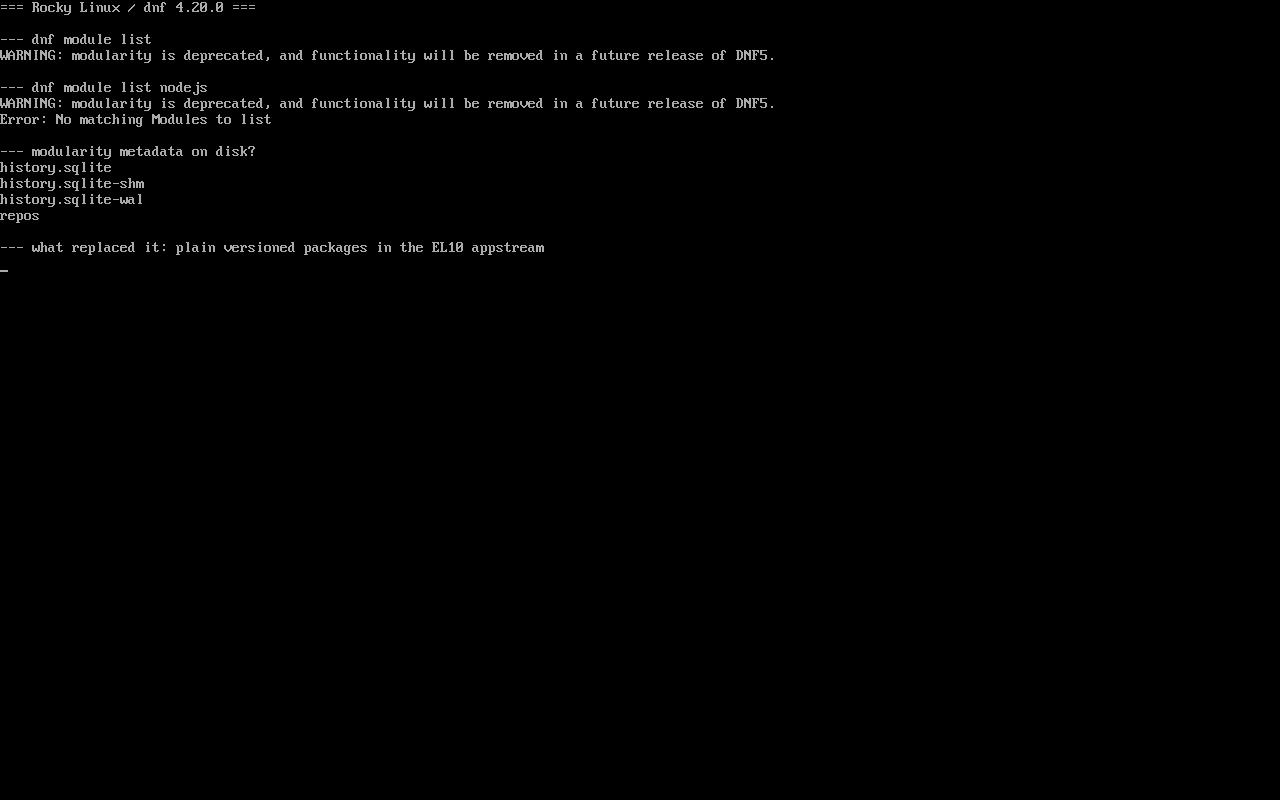
/var/lib/dnf/ holds only history.sqlite, repos and friends — no module metadata at all.
The replacement: versioned package names
Section titled “The replacement: versioned package names”EL10 expresses “multiple versions” with ordinary package names:
$ dnf -q list --available 'php8*'php8.4.x86_64 8.4.24-1.el10_2 appstreamphp8.4-cli.x86_64 8.4.24-1.el10_2 appstreamSo php defaults to 8.3 and php8.4 can be installed alongside; nodejs is 22.x with no 18/20/24 tracks; exact versions are pinned by NEVRA, e.g. dnf install nodejs-22.23.1-4.el10_2.
Migration checklist
Section titled “Migration checklist”| EL9 usage | EL10 replacement |
|---|---|
dnf module enable nodejs:20 | drop it; dnf install nodejs (22.x) |
dnf module install php:8.2/common | dnf install php8.4 (or the matching versioned name) |
dnf module list --enabled | none; use dnf list --installed |
code that greps .module_el9 in rpm -q | switch to version checks |
Ansible dnf: name=@nodejs:20/common | name=nodejs |
Common traps
Section titled “Common traps”- Retrying does not help:
dnf module enableis a hard error on EL10 and will keep failing in CI; - Assuming packages disappeared:
dnf list --available nodejsstill lists them, just without alternative tracks; - Major upgrades:
rpm -qoutput changes because module-tagged builds have no equivalent on EL10; - Multiple major versions: expressed by different package names (
php8.4), not by streams.
Practice: rewrite one module command
Section titled “Practice: rewrite one module command”dnf module list nodejs 2>&1 | tail -2dnf -q list --available nodejs php8.4 2>/dev/null | head -4Checks:
- The first command reports
No matching Modules to liston EL10; - The second lists concrete versions for
nodejsandphp8.4; - Every
module enable/installin your scripts is replaced by a package name; rpm -qconfirms installed packages carry no.module_el*tag.
常见问题
Will modularity come back?
No. The warning states modularity is deprecated and DNF5 removes the commands; the new model is plain packages.
Is EL9 modularity still usable?
Yes for the EL9 lifetime, but any upgrade path to EL10 requires rewriting those commands first.
What if I need an older major version?
Use containers for the old runtime, or a third-party repository; official EL10 repos only ship the current major version.
Next steps
Section titled “Next steps”- Repository conflicts: /en/repo-priority/
- Offline installs: /en/offline-updates/
- Transaction rollback: /en/dnf-history-rollback/