
Rocky 10: writing, listing and removing firewalld rich rules
Test scope
Section titled “Test scope”In a Rocky Linux 10.2 privileged container (firewalld 2.4.3, default bridge network isolated from the host) with firewalld started: --add-rich-rule, --reload, --list-rich-rules, --remove-rich-rule, plus a deliberately wrong removal as a control case. Log: plans/content-expansion/evidence/logs/rocky-firewalld-rich-rules.log (tested on Rocky 10.2, firewalld 2.4.3).
The container shares the host kernel (5.14) while firewalld and systemd are genuine EL10 userspace; anything about kernel netfilter behaviour belongs on a real host.
What rich rules add
Section titled “What rich rules add”A plain allow answers “which port or service in this zone”; a rich rule adds conditions: source, destination, protocol, logging and rate limiting. Typical cases are “only this subnet may reach 8080” and “allow SSH but log and rate-limit it”.
Restrict a port to one subnet
Section titled “Restrict a port to one subnet”R1='rule family="ipv4" source address="192.0.2.0/24" port port="8080" protocol="tcp" accept'sudo firewall-cmd --permanent --add-rich-rule="$R1"sudo firewall-cmd --reloadsudo firewall-cmd --list-rich-rulessuccesssuccessrule family="ipv4" source address="192.0.2.0/24" port port="8080" protocol="tcp" acceptOnly 192.0.2.0/24 reaches 8080; other sources still follow the zone policy.
Log and rate-limit an allow rule
Section titled “Log and rate-limit an allow rule”R2='rule family="ipv4" service name="ssh" log prefix="SSH-ACCESS: " level="notice" limit value="3/m" accept'sudo firewall-cmd --permanent --add-rich-rule="$R2"sudo firewall-cmd --reloadsudo firewall-cmd --list-rich-rulesrule family="ipv4" source address="192.0.2.0/24" port port="8080" protocol="tcp" acceptrule family="ipv4" service name="ssh" log prefix="SSH-ACCESS: " level="notice" limit value="3/m" acceptlog records matching connections and limit value="3/m" caps the logging rate only, not how fast connections are established. The prefix must make the rule identifiable during troubleshooting.
Removal is an exact string match
Section titled “Removal is an exact string match”sudo firewall-cmd --permanent --remove-rich-rule="$R1"sudo firewall-cmd --reloadsudo firewall-cmd --list-rich-rulessuccesssuccessrule family="ipv4" service name="ssh" log prefix="SSH-ACCESS: " level="notice" limit value="3/m" acceptRemoval matches by rule content: a trailing extra space was tolerated in testing (whitespace is normalised), but a rule whose conditions differ (port, address) removes nothing and only prints a warning:
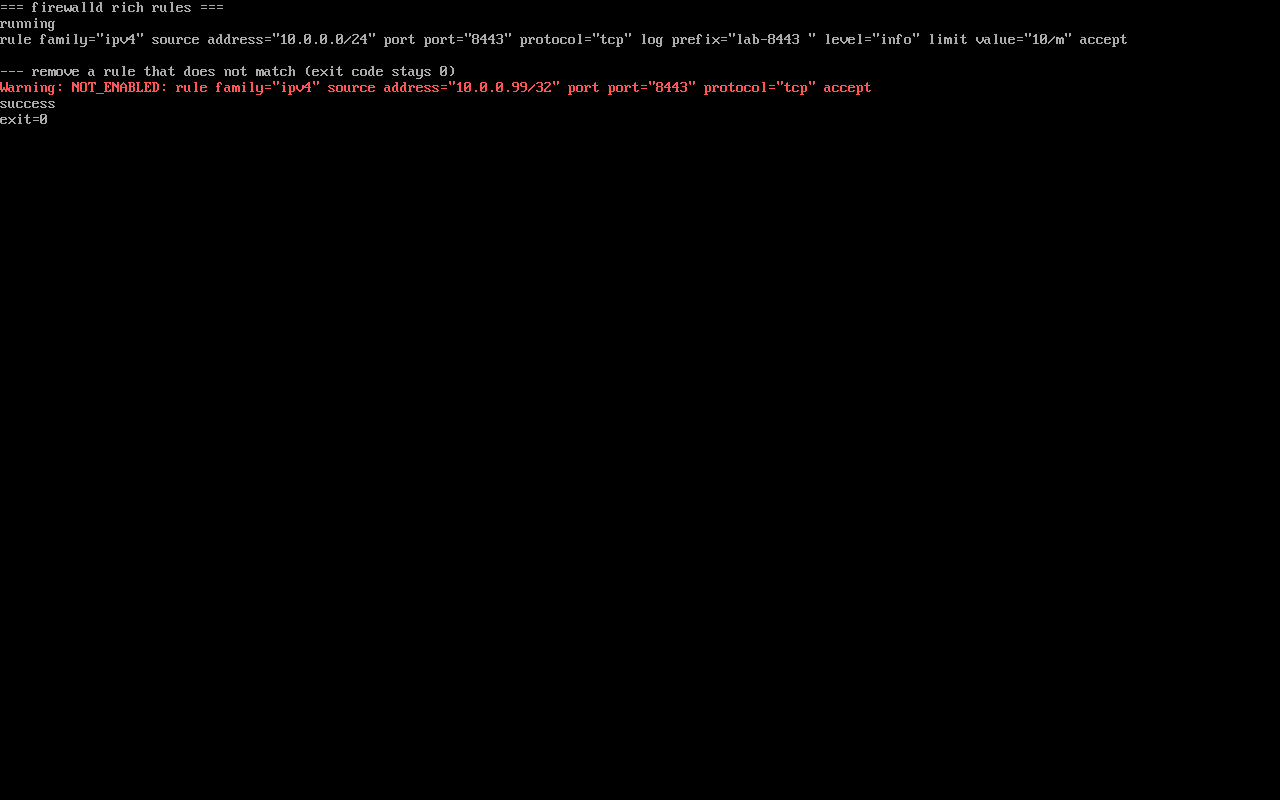
Warning: NOT_ENABLED: rule family="ipv4" source address="198.51.100.0/24" port port="9091" protocol="tcp" acceptsuccessIts exit code is still 0, so scripts must not rely on $? alone — check the output for NOT_ENABLED.
Common traps
Section titled “Common traps”- Wrong rule, no error:
Warning: NOT_ENABLEDis printed while the command returns success; grep the output instead of trusting the exit code; - Forgetting
--permanentplus--reload: runtime-only changes vanish on restart; - Interaction with service/port rules: rich rules are evaluated first, and a match stops the zone’s ordinary rules.
Practice: add two rich rules and remove one precisely
Section titled “Practice: add two rich rules and remove one precisely”R='rule family="ipv4" source address="10.0.0.0/24" port port="8443" protocol="tcp" accept'sudo firewall-cmd --permanent --add-rich-rule="$R"sudo firewall-cmd --reloadsudo firewall-cmd --list-rich-rulessudo firewall-cmd --permanent --remove-rich-rule="$R"sudo firewall-cmd --reloadsudo firewall-cmd --list-rich-rulesChecks:
- The rule appears after adding
- It disappears after removal
- Changing the port in the removal string prints
Warning: NOT_ENABLEDand leaves the rule in place --permanent --list-rich-rulesmatches the runtime list
常见问题
How is a rich rule different from add-port?
add-port allows the port for the whole zone; a rich rule adds source, destination, logging or rate conditions. Use it when only certain sources may connect.
Why does remove-rich-rule keep failing?
It matches the string exactly. Copy the output of --list-rich-rules verbatim (quotes and spaces included) or keep the string in a variable from the start.
Does limit cap connections?
No. It caps how often the log (or action) fires, not how fast connections are established; connection rate limiting needs other mechanisms such as nftables limits or an upstream proxy.
Next steps
Section titled “Next steps”- Zones and port rules: firewall-cmd port rules
- Plain port rules:
/en/firewalld-zones/(EL9 page; the basic usage outside rich rules) - Network triage: Triage network problems by symptom