
Rocky 10: move journald logs out of memory onto disk
Test scope
Section titled “Test scope”Tested on a PVE Rocky Linux 10.2 VM with a minimal install (349 packages), systemd 257-23.el10_2.1.rocky.0.1.
Three facts about the untouched system:
| Check | Result |
|---|---|
/etc/systemd/journald.conf | absent (only the commented template in /usr/lib) |
Effective Storage | auto |
/var/log/journal | absent → everything volatile |
What volatile means in practice
Section titled “What volatile means in practice”Storage=auto is shorthand for “persist when the directory exists, otherwise stay in memory”. Without /var/log/journal, journald writes under /run/log/journal/<machine-id>/, and /run is a tmpfs:
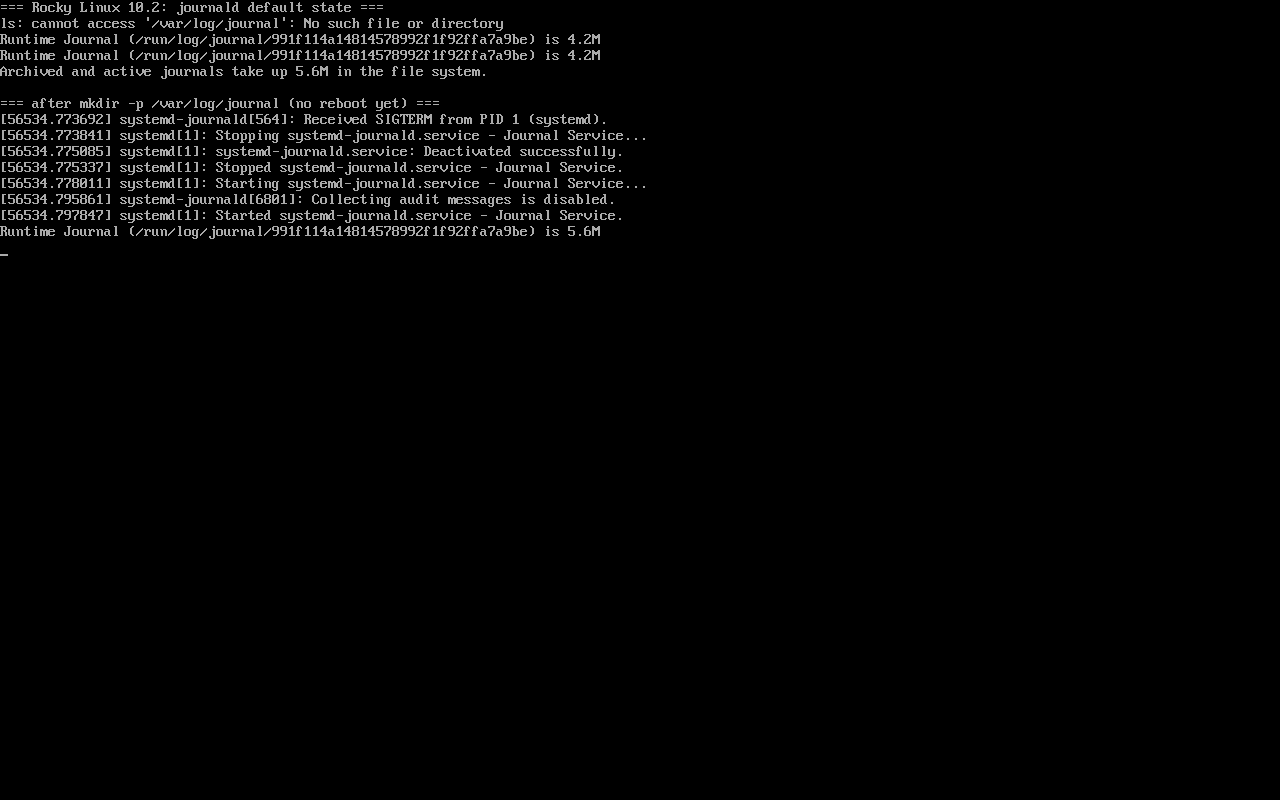
$ journalctl --disk-usageArchived and active journals take up 5.6M in the file system.That 5.6M is gone after a reboot. Most “my logs vanished after restart” reports are this, not a journalctl mistake.
Switching: directory first, reboot to apply
Section titled “Switching: directory first, reboot to apply”# mkdir -p /var/log/journal# systemctl rebootAfter boot, journald states where it landed:
$ journalctl -u systemd-journald -b --no-pager | grep "Journal ("System Journal (/var/log/journal/c9bf91c1c75e4ff192415c3b38a521c3) is 12.5M, max 894.4M, ...Ownership is repaired automatically:
drwxr-sr-x+ root systemd-journal (2755 with an ACL)max 894.4M is the default SystemMaxUse, 10% of the root filesystem. Pin it with a drop-in under /etc/systemd/journald.conf.d/.
Expect the restart to fail you
Section titled “Expect the restart to fail you”Measured: writing Storage=persistent (drop-in and main file both) followed by systemctl restart systemd-journald left journald logging Runtime Journal (/run/log/journal/...) with an empty /var/log/journal. Three attempts, including one after deleting /run/log/journal, behaved the same.
A full reboot applies it immediately. So an automation step of “edit config, restart service” does not complete the migration; schedule a reboot or wait for the next window.
Three filters that cover daily work
Section titled “Three filters that cover daily work”$ journalctl --list-boots --no-pager | tail -2 # which boots exist$ journalctl -u sshd -n 2 --no-pager # last two lines of one unit$ journalctl -p err -b --no-pager | tail -2 # errors in this bootThe usual order is -b to pin the boot, -u to narrow to a service, then -p or --since to shrink the window.
Reclaim with vacuum, never rm
Section titled “Reclaim with vacuum, never rm”$ journalctl --vacuum-size=2MVacuuming done, freed 0B of archived journals from /run/log/journal.Vacuuming done, freed 0B of archived journals from /var/log/journal/c9bf91c1c75e4ff192415c3b38a521c3.Output appears per directory, and the active system.journal is never deleted — freed 0B is expected, not a broken command. For time-based cleanup use journalctl --vacuum-time=7d.
Common traps
Section titled “Common traps”- Reading current-boot history as proof of persistence;
- Setting
Storage=and forgetting to create the directory; - Editing
/usr/lib/systemd/journald.conf, which package upgrades overwrite; rm -rf /var/log/journal/*, which can desynchronise indices — use--vacuum-*.
Practice: turn volatile into persistent
Section titled “Practice: turn volatile into persistent”journalctl --disk-usagels -d /var/log/journal || echo "not persistent yet"sudo mkdir -p /var/log/journalsudo systemctl rebootThen verify:
journalctl --disk-usagejournalctl -u systemd-journald -b | grep "System Journal"ls -ld /var/log/journal/*Checks:
- Before the reboot: no directory, small usage number;
- After it: a
System Journal (/var/log/journal/...)line; - Directory owned by
root:systemd-journal; - Pre-reboot entries are still queryable.
常见问题
Does Rocky differ from Alma here?
Same systemd version (257-23.el10_2.1), same behaviour; only the packaging suffix differs. The conclusions apply to both.
Can persistence be per-service?
No — storage location is global to journald. Per-service needs rsyslog rules or file logging with logrotate.
Is the default 10% too much on a small disk?
Set SystemMaxUse= for a hard cap or SystemKeepFree= for headroom; when both are set the more conservative one wins.
Next steps
Section titled “Next steps”- Text log rotation: /en/log-rotation/
- Repositories and packages: /en/repos/
- Log rotation: /en/log-rotation/